Guide · Legal and compliance
A requirements register in half an hour
A list of what the company is obliged to do — the norm, the obligation in your own words, who answers for it, what proves it, when it is next reviewed. It usually lives in a spreadsheet nobody else opens. Here it is a project: taken ready-made, read as a table, and each row a place where the work happens.
The work it shows takes about half an hour for the first ten rows.
1. Take the register
Two doors lead to the same thing. When you create a company or a project, the form asks Start with and offers Empty board or Requirements register. In a project that already exists it is in the board menu: Ready-made project….
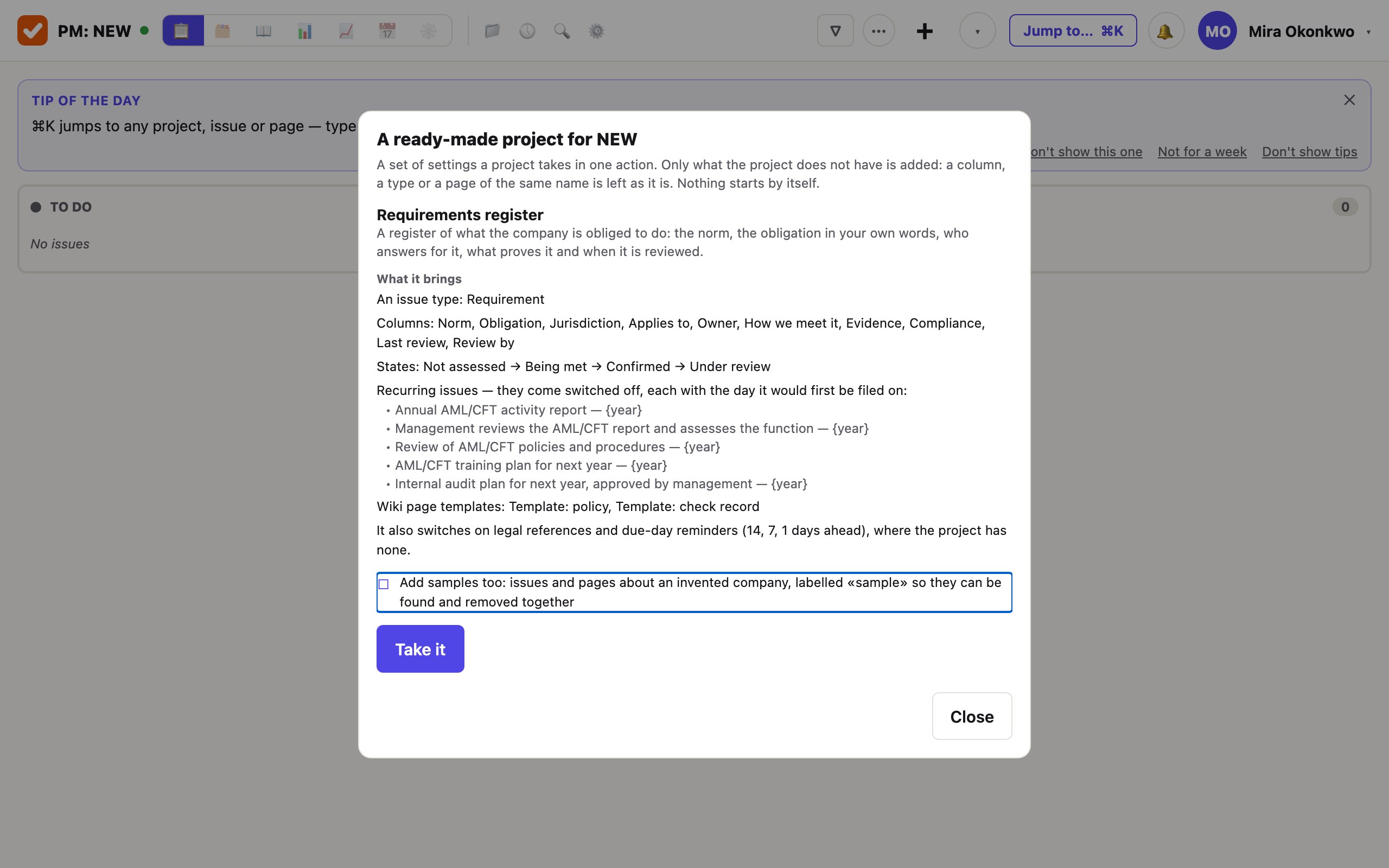
It brings:
- A type called Requirement, beside the ordinary ones.
- Ten columns, asked of that type only: Norm, Obligation, Jurisdiction, Applies to, Owner, How we meet it, Evidence, Compliance, Last review, Review by.
- A workflow of four states: Not assessed → Being met → Confirmed → Under review.
- Five yearly recurring issues, switched off, for you to read, change and switch on.
- Two wiki page templates: a policy and a check record.
- It switches on legal references, and reminders 14, 7 and 1 days before a due day, where the project had none.
Only what the project lacks is added, matched by name: a column, a type or a page of the same name is left as it is. So it is safe to take into a project that already holds work, and taking it twice adds nothing. The workflow alone is taken only by a project with no issues that still has the states it was created with; otherwise the same workflow is offered under States & transitions….
2. Look at the samples, then remove them
Tick the samples box — or choose the register on the creation form, where they come with it — and five requirements and three pages arrive, about an invented payment company. They cite real acts, and their citations are already references.
They are there to be read once. The issues carry the label sample and the pages’ titles begin «Sample:», so they are found and deleted together. Every one ends with a line saying it is a sample and not advice: whether a rule applies to you depends on your licence and your country.
3. Write a row
A requirement is an issue of the type Requirement. Its title is the obligation as a sentence somebody can be asked about; the columns are what a register holds.
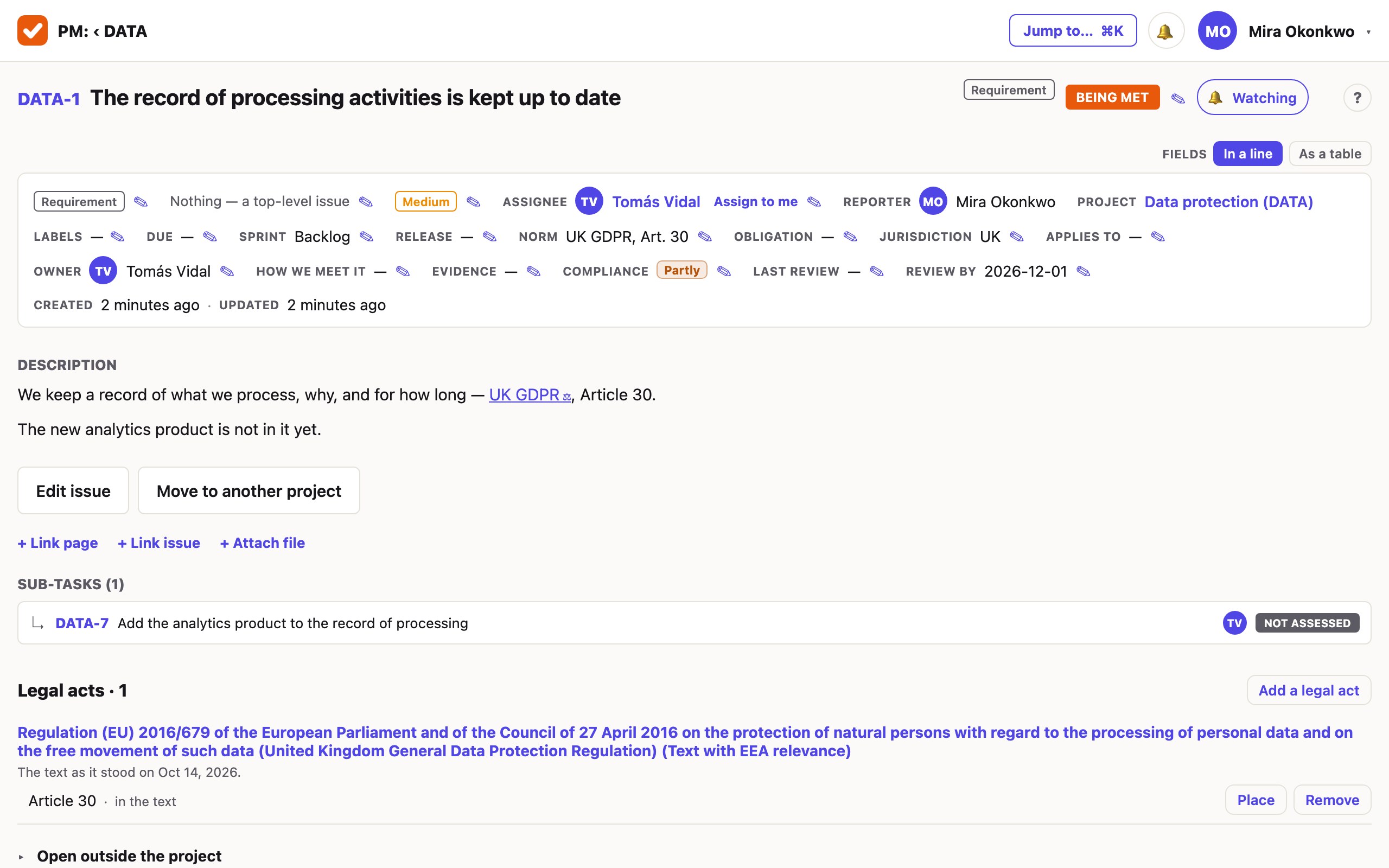
- Norm is the source, as you would write it in a table: «UK GDPR, Art. 30». Cite the act in the description as well — there it becomes a reference to the text.
- Obligation is apart from the norm on purpose. The norm is where the duty comes from; the obligation is what you must actually do, in your own words.
- Compliance — yes, partly, no — is apart from the state. The state says where the work is; the column says what the conclusion was. A requirement can be «Under review» and still «Yes».
- Jurisdiction is text, because «EU» is the commonest answer and is no country.
- Review by is a date in the register. Set the same day as the issue’s due day as well, and whoever the issue is assigned to is told 14, 7 and 1 days before it.
The work a requirement needs — the template that does not exist yet, the three contracts to renegotiate — is filed as tasks under it. A question to its owner, with the answers to choose from, is asked on the issue and waits there until it is answered.
4. Read it as a table
The table view is the register as a register: a row per requirement, your columns in your order.
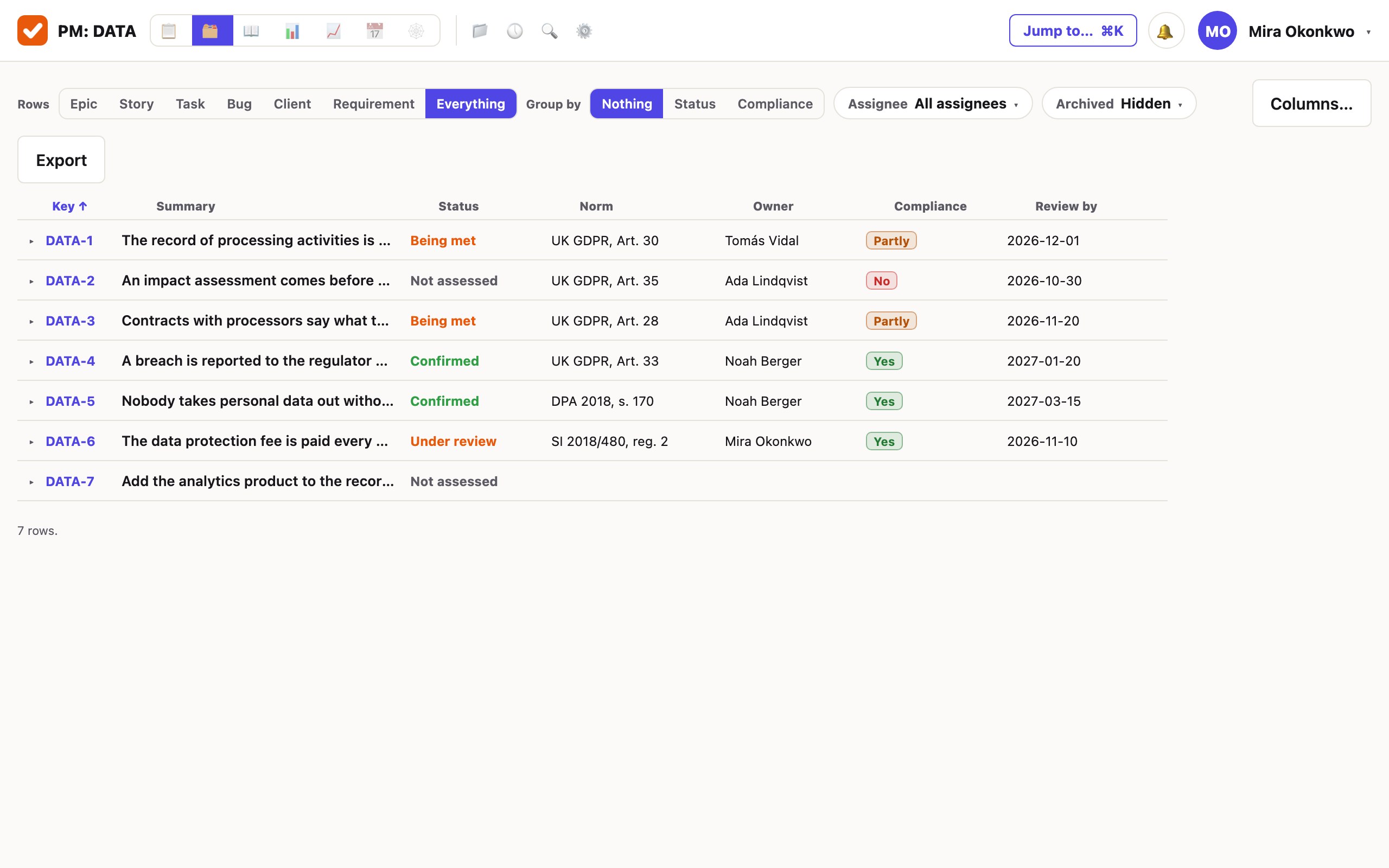
- Rows narrows the table to one type — choose Requirement and the tasks under them step aside.
- Group by status or by Compliance: the second is the reading a reviewer asks for.
- Columns… chooses which columns are shown and in what order; a value is edited in its cell.
- Export downloads what you are looking at as one .xlsx — your columns, your filters and your sort, up to 5,000 rows. In a browser, not in the phone app.
5. Make it yours
What was taken is the project’s own from that moment, with nothing pointing back at a pattern. Rename a column or add one under Fields…; change the answers of Compliance; add a state under States & transitions…. A second project takes the register separately and is changed separately.
The two page templates are ordinary wiki pages marked as templates: change their text, or mark a page of your own with Make a template, and it is offered when a new page is made in that project’s wiki.
If the register already lives in a tracker and a wiki
Some teams already keep this work in the tracker and the wiki their engineers use, with an add-on or two for approving pages. Nothing has to be retyped to try this instead.
- A project is imported from a cloud site of the compatible tracker, in Settings → Import, by a company administrator: the site’s address, an account’s email and an API token. Nothing is written until you have seen the plan and pressed start. Issue keys stay. Issues, comments, files, custom fields and versions are carried; change history, sprints, logged time, watchers and components are not.
- Take the register into the imported project afterwards. It adds only what is missing, so your own columns stay as they are and the register’s arrive beside them.
- The wiki speaks the compatible wiki’s API, so a tool that writes pages there writes them here. There is no importer for pages: a policy is brought by such a tool, or pasted in as Markdown.
What it does not do
- It does not know your obligations. The register is columns and a workflow; the samples are samples. What you are obliged to do is yours to write, and nothing here is legal advice.
- Evidence is text. A column cannot yet point at an issue or a page; write the page’s name, or link the page to the issue under the description.
- No risk column, and no row number. The issue key is the number; a risk column is one you add yourself.
- One ready-made project today. The requirements register, with its words in English and Russian; in any other language of the product it arrives in English and is renamed by you.
- A recurring issue does not fill the register’s columns. It files an ordinary issue with a title, a description and a due day.
- The spreadsheet is a file, not a live link. It is what the table showed when you pressed Export.
Start with ten rows.
Choose the requirements register when you create the workspace and it is there, with its samples. The first month is free and needs no card.
Create a workspace